Week
MoTuWeThFr
Available now
Web app for reception and management
- The whole practice calendar and online booking
- Client records and clinical notes
- Invoices, payments and reports
FyzioDesk guards your calendar, reminds clients of appointments, keeps records with full history and issues invoices with a QR code. On your computer, tablet and phone — mobile apps for therapists and clients are in the works.
EU servers, a data processing agreement and consent signed on a tablet. In Slovak, Czech or English.
Tuesday
Booking, reminders, client records, exercise plans and invoicing in one booking system for physiotherapy and massage.
Instead of a paper diary, Excel, WhatsApp, Google Calendar, paper records.
FyzioDeskTuesday, 14 Oct
Enter your numbers. It's an estimate, not a promise, and the assumptions are right below.
Booking, reminder, notes, invoice, tracking the payment.
Each month you could save
8.6 h
That's roughly 1.1 working days.
We count 4.3 weeks per month and an 8-hour working day. You set the share the app takes over.
From the first client in the morning to invoices in the evening. This is what a day looks like when everything runs in one app.
8:50
Visit notes are never overwritten, only versioned. You always see who wrote what and when. Note templates, body chart, McKenzie and referral letters live right in the client record.
9:05
Photos are taken in the app, not in the phone's gallery, and can't be uploaded without a signed consent. Compare before and after side by side.
9:15
Exercises with video, sets and reps. Clients tick them off and log pain from 0 to 10. You see who is exercising and who isn't.
17:30
An invoice from a visit in two clicks, a QR payment right on it and a monthly export for your accountant. The QR code follows Slovak or Czech banking standards based on the clinic's country.
Instead of calls during a session and texts to your personal phone. Clients write through the portal, you reply when you have a moment.
Changing software shouldn't mean retyping your client list or a week of chaos. Here's how it goes.
Reception works on the web, therapists use their phone at the treatment table, clients carry appointments and exercises in their pocket. The same data everywhere. We're currently building the mobile apps for therapists and clients.
Week
Available now
Today, Tuesday
M. Kováčová
Therapy, 50 min
After knee surgery, no deep squats
Photo consent signed
Coming to iOS and Android
Hello, Mary
Next appointment
Thursday, 9:30
Jana, Therapy
Today's exercises
2 of 3 done
Coming to iOS and Android
Want to know when the app is in the stores?
Leave us your email. We'll only use it for this. Until the apps are in the stores, the client portal works in any phone browser.
In clinics where clients continue with a coach after therapy, the plan and the restrictions travel with them. The coach knows what the client must avoid, but never sees clinical records.
The physiotherapist records restrictions
Contraindications sit at the top of the client record, and the app flags unsuitable exercises when building a plan.
Builds a plan and hands it to the coach
A training plan with several sessions, sets and reps. The coach finds it in their list of handed-over plans.
The coach runs the training and sees adherence
Adjusts exercises and sees whether the client trains. Sees contraindications, never visit notes, history or photos.
New: AI assistant
A client writes when they could come in. The AI assistant works out what they want, finds free slots in your calendar and drafts the reply. All you do is click a slot.
Show it to me live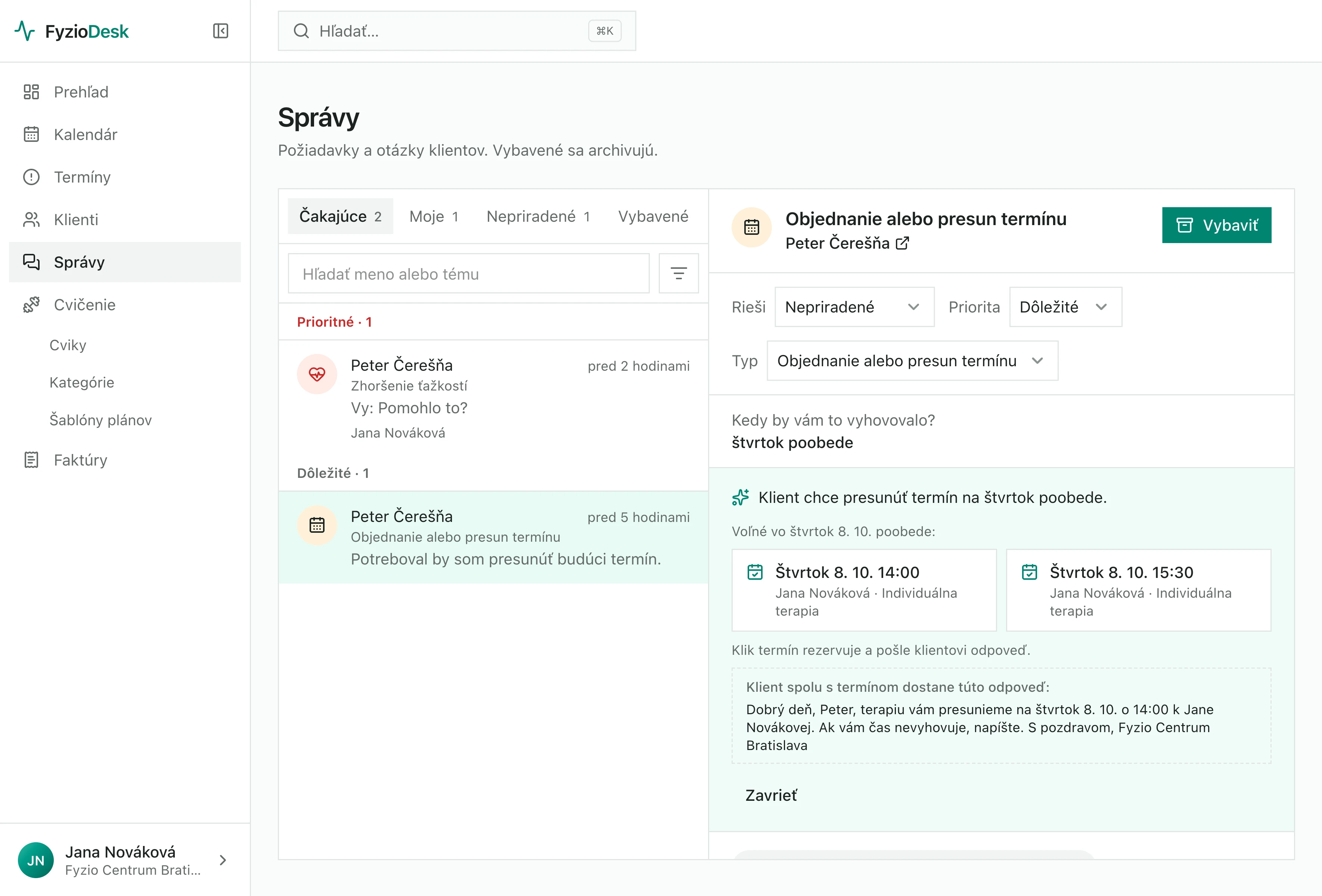
Reads the message
Turns a long message into one sentence: what the client wants and when they can come.
Finds a free slot
Searches your calendar based on what the client wrote. If nothing is free then, it offers the nearest free slots.
Writes the reply
Polite and addressed to the client by name. You don't start from scratch, you just check it.
You decide
Clicking a slot books it and sends the client the reply. Nothing goes out without you.
The same assistant is there when you write notes, before a visit and when you build an exercise plan. It suggests, you decide.
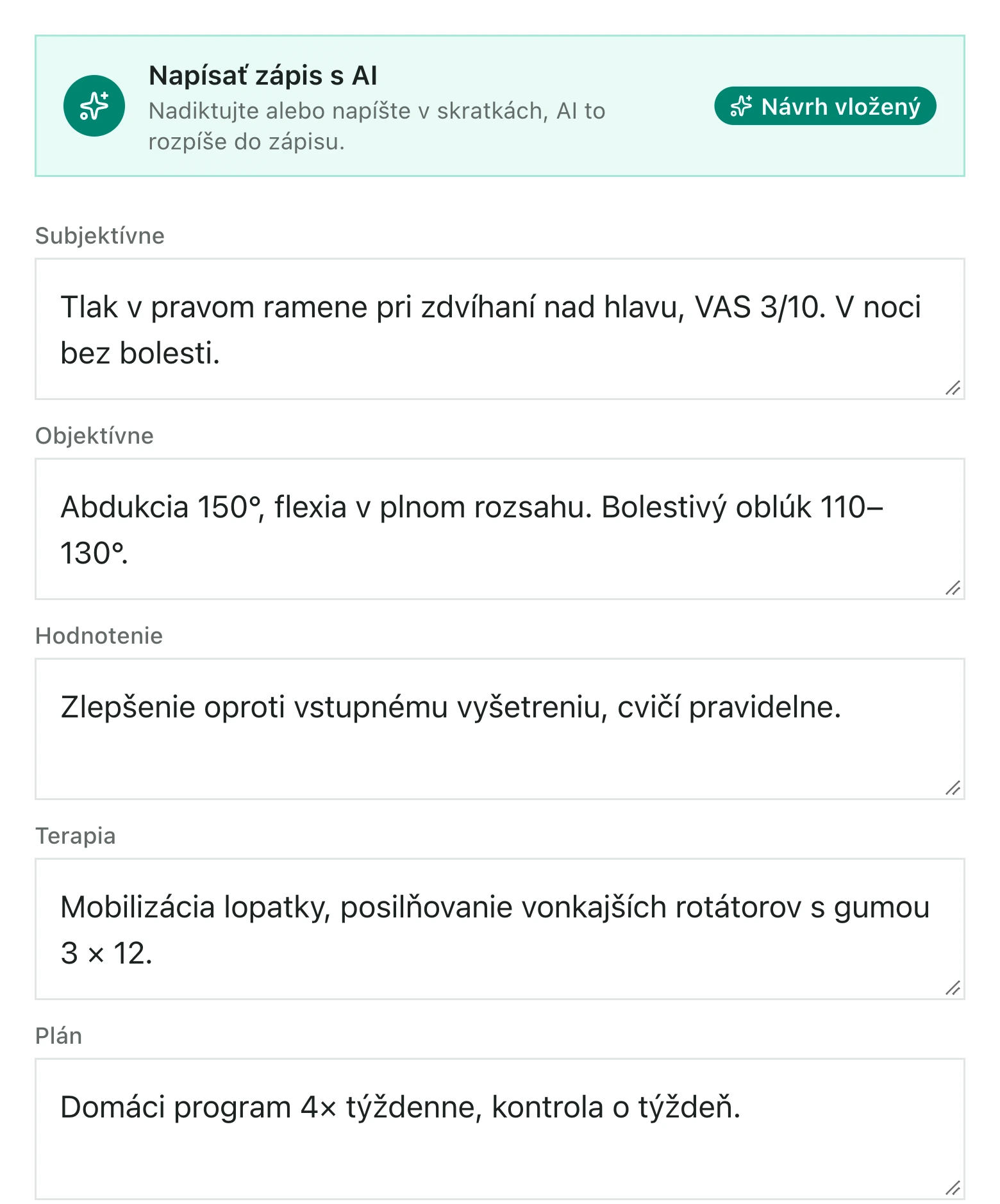
After the session, dictate what you did into your phone. AI turns it into a structured note and flags what's missing. You just check it and save.
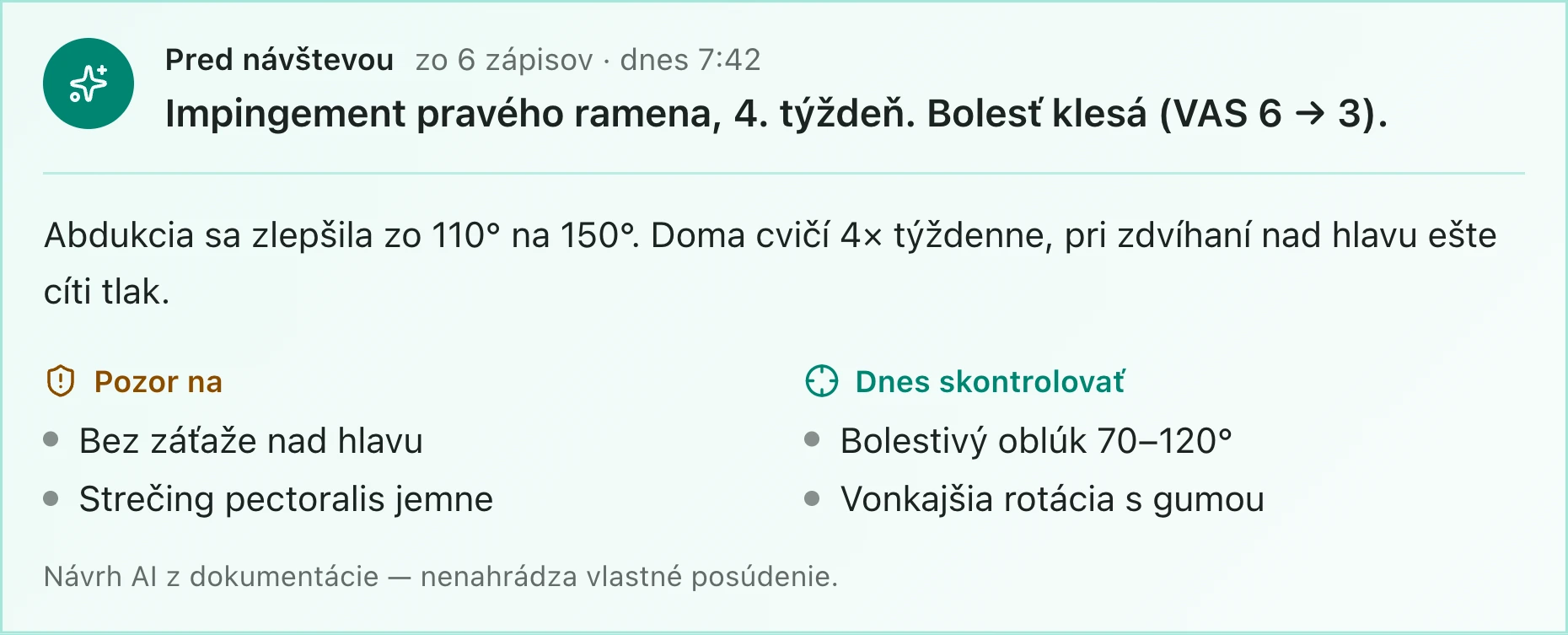
Before the client walks in, you know where you left off: progress so far, what to watch out for and what to check today. Summarised from the card and recent notes.
AI picks exercises from your library based on the diagnosis, goals and contraindications, and suggests the dosage. The plan is a draft; the client sees it only once you approve it.
Client data is sensitive. So the AI only gets what it really needs for the task — never who the client is.
Worrying about data “somewhere in the cloud” is reasonable — it's your clients' health. So here is exactly where the data is, who can access it and what happens to it.
GDPR and records the law requires — handled for you
As a healthcare provider you don't need clients' consent to process their data — FyzioDesk shows them a privacy notice instead, which you insert from a template. Information and informed consent to treatment go into the client record and can no longer be rewritten. The data processing agreement is published and you accept it in the app with one click.
Read the data processing agreementWe'd rather say it up front. The order is decided by the clinics that start with us and by the survey answers.
A short anonymous survey.
Planned
SMS and push reminders
The gateway connection is built; we're switching it on in the coming weeks.
Slovak eKasa
Document numbering is already prepared for it.
Health insurer claims
Once the official file format is published.
Mobile apps in the App Store and Google Play
For therapists and clients. Until then, the portal works in the browser.
We're looking for the first practices to shape FyzioDesk with us.
We build FyzioDesk because physiotherapists spend their evenings on admin that an app should be doing for them. The first clinics will help decide what it becomes.
We'll set up your own demo practice with clients, appointments, notes and exercise plans. Once approved, we'll email you a link; the demo runs for 24 hours from the first time you open it, and nothing is ever sent to anyone.
A printable form for new clients: reason for visit, pain, medical history and contraindications. Adapt it to your practice.
Move clients and appointments from your old system with a CSV file.
Set up clinics and rooms
A clinic is an address, a room is where you treat.
Add services
With duration, price and buffer between clients.
Invite your team
And decide who works at which clinic.
Set working hours
Free slots are calculated from them.
Bring your clients
From your old system via CSV, or one by one.
Turn on reminders
So clients stop forgetting their appointments.
Pay monthly, or yearly at a discount — no commitment. Prices exclude VAT.
Forever, no card. To get your practice started.
€0
One therapist at one clinic.
25 €21 €per month
or 21 € a month billed yearly (−16%)billed yearly 252 €
excl. VAT
Up to five therapists plus reception.
79 €66 €per month
or 66 € a month billed yearly (−16%)billed yearly 792 €
excl. VAT
Clinic networks and custom integrations.
Custom
We're still setting the price with our first clinics, based on practice size. We can talk about it in the demo.
No. The database prevents it, so it can't happen even if two people click in the same second. The second one is offered the nearest free times.
Clients and appointments move over via CSV. If your previous vendor won't give you an export, get in touch.
No. Reception gets the calendar and payments. The separation is deliberate.
Yes. Coaches have their own role in the team: they receive the training plan from the physiotherapist and see the client's contraindications and adherence. They never see visit notes, medical history or photos.
It's safer than in a notebook or on a laptop. The server is in Frankfurt in the EU, the connection is encrypted, you sign in with a password and a code from your phone, and the database and photos are backed up every night. Your practice's data is separated from others in the database and every sign-in is recorded.
Yours. Download your whole client register, appointments, records and invoices in one file at any time, and one practice's data never reaches another.
Yes, with every practice. The text and the list of our sub-processors are on the Data processing agreement page; the practice admin accepts it in the app, and we will send a signed copy on request. You remain the controller of your clients' data; we only process it so the app works.
Each clinic has its own time zone, currency and message language. QR payments follow Slovak or Czech standards based on the country.
By email for now, the day before and on the day of the appointment. The SMS gateway connection is built and we're switching it on in the coming weeks.
Not yet. Referrals are tracked and redeemed in the app. Claims will follow once the official file format is final.
It's in progress. Document numbering is already kept per location, so nothing will need renumbering at launch.
Twenty minutes over video. We'll walk through the calendar, a client record and an exercise plan using examples from your clinic.
FyzioDesk news
An occasional email about what's new in the app and changes in regulations for physiotherapists. No third-party ads.